Showing posts with label Tech Feed. Show all posts

Wednesday, May 18, 2016

Playable Games List for Intel® HD Graphics 4200/4400

I've been reading that Intel Graphics can now perform better at gaming. This is good news to all of us who are casual and mainstream gamers. Now we don't need to buy expensive video cards for our entertaiment needs. As I was searching for playable games for Intel HD graphics, I saw a page from Intel stating their tested games for their graphics engine.

Below are details copied from http://www.intel.com/content/www/us/en/support/graphics-drivers/000005551.html

The games listed are a sample of popular games. These games play great at 30 frames per second, or higher, on 4th Generation Intel® Core™ Processors with Intel® HD Graphics 4200 or Intel® HD Graphics 4400.
The graphics numbers listed next to the titles (4200/4400) link to screenshots with recommended game settings. Select the appropriate link for the graphics product that you own.
NoteIntel tested these games on a computer with the following:
  • 1954 Alcatraz*
  • Aggression*
  • AION*
  • ArmA III*1 4200 | 4400
  • Asura*
  • Batman: Arkham Origins Blackgate*
  • Battle Block Theater*
  • Battlefield 4* 4400
  • Beat Buddy*
  • Beyond Space*
  • BioShock DLC - Burial At Sea Part II*
  • Black Gold Online*1
  • Blade & Soul*
  • Broken Age*
  • Cabela's Big Game Hunter Pro Hunts*1
  • Castlevania: Lord of Shadows 2*
  • Child of Light*1
  • Chinese Fairy Tale 2*
  • Civilization 5* 4200 | 4400
  • Counter Strike Online*
  • Counterstrike: Global Offensive* 4200 | 4400
  • CrossFire* 4400
  • DayZ* 4200 | 4400
  • Dark Blood Online*
  • Dark Souls II 4200
  • Defense Grid 2*1
  • Deus Ex: The Fall*
  • Diablo III: Reaper of Souls* 4200 | 4400
  • Divinity: Original Sin*1
  • DOTA 2 (Defense of the Ancients)* 4400
  • Double Dragon Neon*
  • Dragon Age: Inquisition 4200
  • Dream Sanguo*
  • Drox Operative*
  • Dynasty Warriors 8: Xtreme Legends*
  • ElSword*
  • Enemy Front*1
  • Ethan Meteor Hunter*
  • F1 2014*
  • Faery: Legends of Avalon*
  • FIFA 2015*
  • Final Fantasy XIV*1 4400
  • Firefall*1
  • Fruit Ninja Lite*
  • Garry's Mod* 4200 | 4400
  • Goat Simulator*1
  • GRID Autosport*
  • Guildwars II* 4200 | 4400
  • Guise Of The Wolf*
  • Halo: Spartan Assault*1
  • Hearthstone: Heroes of Warcraft*1 4200 | 4400
  • Hegemony Rome: The Rise of Ceasa*1
  • Helicopter Simulator 2014: Search and Rescue*1
  • Horizon*
  • Hyper Fighters*
  • Infinite Scuba*
  • Jade Dynasty*
  • JiuYinZhenJing*
  • Joe Danger: PC*
  • JX3 dx11*
  • KickBeat Steam Edition*1
  • Killer is Dead - Nightmare Edition*
  • Kingdom Tales 2*
  • League of Legends* 4400
  • LEGO Minifigures*
  • LEGO Minifigures ONLINE*
  • LEGO The Hobbit*
  • LEGO: The Movie video game*
  • Lili: Child of Geos*1
  • Lineage 2*
  • Little Racers Street*
  • Loadout*
  • Lost Saga*
  • Magic 2014: The Gathering - Duels of the Planeswalkers*
  • Metal Gear Rising - Revengeance*
  • Minecraft* 4200 | 4400
  • Minecraft Pocket Edition*
  • Moorhuhn: Tiger and Chicken
  • MXGP - The Official Motocross Videogame*
  • NASCAR '14*1
  • NBA 2K15*
  • NeoTokyo*
  • NiZhan*
  • Octodad Dadliest Catch*
  • Perfect World*
  • Pro Cycling Manager 2014*
  • Q.U.B.E: Director's Cut*
  • QQ X5 (dancing)*
  • Rambo The Video Game*1
  • Rayman Legends*
  • Recycle*
  • Rekoil*
  • Resident Evil 4*1
  • Return to Mysterious Island 2*
  • Richard & Alice*
  • Riptide GP 2*
  • Rome II*
  • Royal Quest*
  • Rust 4200
  • Sacred 3*
  • Shadowrun Returns*
  • Sims 4 4400
  • Smite* 4200
  • Snow*
  • Special Force2*
  • SPINTIRES*1
  • Star Trek Online*
  • Starbound*
  • Starcraft II Heart of the Swarm* 4200 | 4400
  • Star Wars: The Old Republic* 4200 | 4400
  • Street Fighter X Tekken*
  • Strider*
  • Strike Suit Zero: Director's Cut*
  • Strike Vector*
  • Sudden Attack*
  • SwordMan*
  • TERA*
  • The Amazing Spider-Man 2*
  • The Elder Scrolls Online*
  • The Incredible Adventures of Van Helsing II*1
  • The Sims 4* 4200
  • The Walking Dead: Season 2*
  • TianLongBaBu*
  • Titanfall*
  • Total War: Rome II 4400
  • Transformers Rise of the Dark Spark*1
  • Transformers Universe*1
  • Transistor *
  • Trine 2*
  • Tropico 5*
  • Warface*1
  • Wargame: Red Dragon*
  • War Thunder 4200 | 4400
  • World of Tanks 4200 | 4400
  • World of Warcraft: Warlords of Draenor*
  • World of Warcraft: Mists of Pandaria PRC*
  • World of Warplanes*
  • WRC Powerslide*
  • Yaiba: Ninja Gaiden Z*1

These titles require you to manually lower some of the game settings.
Product and performance information
Software and workloads used in performance tests might be optimized for performance only on Intel® microprocessors. Performance tests, such as SYSmark and MobileMark, are measured using specific computer systems, components, software, operations, and functions. Changes to any of these elements might cause the results to vary.
You should consult other information and performance tests to assist you in fully evaluating your purchases, including the performance of that product when combined with other products.

-end-

Additional Reference: 
Playable Games List for Intel® HD Graphics 2500/4000
http://www.intel.com/content/www/us/en/support/graphics-drivers/000005659.html


Playable Games List for Intel® HD Graphics 3000/2000
http://www.intel.com/content/www/us/en/support/graphics-drivers/000005565.html

Tuesday, October 7, 2014

Windows 10 now available as a Technical Preview

Microsoft has released the public version of the Windows 10 Technical Preview. Now everyone can join the testing phase of the upcoming Windows. In this stage, Microsoft aims to look for possible scenarios that the new operating system might have some issues or bugs. This version is not the final version, so when you download and try this, expect that the product is not perfect. You can send errors or suggest features that might help in the development of the product. If you're lucky, you're suggested feature might be named after you. :)

Join Microsoft as they build Windows 10

Be a part of every step

Join the Windows Insider Program so you can be part of every key moment along the way as we create Windows 10. You'll get Windows 10 Technical Preview, all the builds as soon as they're available, and an easy-to-use feedback app.

To join the insider program and download Windows 10 Technical Preview visit,  windows.microsoft.com/en-us/windows/preview 

Monday, August 11, 2014

Tips for Lenovo K900

I. Screenshot in Lenovo K900
* Hold the POWER Button and the LOW Volume Key at the same time

image

II. Open Active Applications
* Hold the Menu Button and wait for the active Applications to show up
image

Wednesday, August 6, 2014

Meaning of the suffixes found on Intel CPUs

What is the meaning in K in i7?
Is U defined as Ultrabook in Intel CPUs?

Intel uses suffixes in their CPU product code. To help you identify the meaning of suffixes, I have gathered their meaning for everyone's reference. 


For 4th Generation (Haswell) CPUs:

Processor name = brand (Intel® Core™) + modifier (i7) + gen (4) + SKU (770) + product line (K)


Processor name = brand (Intel® Core™) + modifier (i7) + gen (4) + SKU (900) + product line (M) + letter suffix (Q)

Alpha Suffix Description Example
Desktop
K Unlocked Intel® Core™ i7-4770K processor
R Desktop processor based on BGA1364 (mobile) package with high performance graphics Intel Core i7-4770R processor
S Performance-optimized lifestyle Intel Core i7-4770S processor
T Power-optimized lifestyle Intel Core i7-4770T processor
Mobile (Notebook and Tablets)
HQ High performance graphics Intel® Core™ i7-4700HQ processor
MX Mobile extreme edition Intel Core i7-4940MX processor Extreme Edition
MQ Quad-core mobile Intel Core i7-4900MQ processor
Intel Core i7-4702MQ processor
M Mobile Intel Core i7-4600M processor
Intel Core i5-4300M processor
U Ultra-low power Intel Core i7-4550U processor
Y Extremely low power Intel Core i7-4610Y processor


For 3rd Generation (Ivy Bridge) CPUs:
              
Processor name = brand (Intel® Core™) + modifier (i7) + gen (3) + SKU (770) + product line (K)

Processor name = brand (Intel® Core™) + modifier (i7) + gen (3) + SKU (920) + letter suffix (X) + product line (M)
Alpha Suffix
Description Example
Desktop
K Unlocked Intel® Core™ i7-3370K processor
Intel Core i5-3570K processor
S Performance-optimized lifestyle Intel Core i7-3770S processor
Intel Core i5-3550S processor
T Power-optimized lifestyle Intel Core i7-3770T processor
Intel Core i5-3570T processor
Mobile
M Mobile Intel® Core™ i7-3520M processor
QM
Quad-core mobile Intel Core i7-3820QM processor
U Ultra-low power Intel Core i7-3667U processor
Y Extremely low power Intel Core i7-3689Y processor


 For 2nd Generation (Sandy Bridge) CPUs:
 Processor name = brand (Intel® Core™ processor) + number (i7-2600)

  For 1stGeneration (Nehalem) CPUs:
Processor name = brand (Intel® Core™ processor) + number (i7-940)
 Processor numbers for the previous generation Intel Core processor family have an alpha/numerical identifier followed by a three-digit numerical sequence.
Processor name = brand (Intel® Core™2 Duo processor) + number (E8500) Processor numbers for the Intel® Core™2 processor family brands are categorized with an alpha prefix followed by a four-digit numerical sequence. The table below explains the alpha prefixes used for the Intel Core 2 processor family.
Alpha Prefix Description
QX Desktop or mobile quad-core extreme performance processors
X Desktop or mobile dual-core extreme performance processors
Q Mobile quad-core high performance processors
E Desktop energy efficient dual-core processors with TDP greater than or equal to 55 W
T Mobile highly energy efficient processors with TDP 30-39 W
P Mobile highly energy efficient processor with TDP 20-29 W
L Mobile highly energy efficient with TDP 12-19 W
U Mobile ultra high energy efficient with TDP less than or equal to 11.9 W
S Mobile small form-factor with 22x22 BGA package


  For Previous Generation CPUs:
Processor name = brand (Intel® Core™2 Quad processor) + number (Q9550S)
Processor numbers for the Intel® Core™2 Quad family have an alpha prefix followed by a four-digit numerical sequence. Additionally, low power Intel Core 2 Quad processors are identifiable by an "S" suffix, which represents processors having a lower thermal design power.

Intel® Atom™ processors

Processor numbers for the Intel® Atom™ processor family are categorized by a three-digit numerical sequence. Netbook class Intel® Atom™ processors have an alpha prefix of N, and Intel Atom processors with an alpha prefix of Z indicate the processor is for Mobile Internet Devices (MIDs).
A higher number within a processor class or family generally indicates more features. A higher processor number may have more of one feature and less of another.
             
Processor name = brand (Intel® Atom™ processor) + number (330)


Processor name = brand (Intel® Atom™ processor) + number (N270)

Intel® Pentium® processors

Processor numbers for the Intel Pentium brand have an alpha prefix followed by a four-character numerical sequence. All are desktop energy-efficient dual-core processors with TDP that is greater than or equal to 65 W.
A higher number within a processor class or family generally indicates more features such as cache, clock speed, Front Side Bus or other Intel technologies.¹ A higher number processor may also have more of one feature and less of another.
Processor name = brand (Intel® Pentium® processor) + number (E2200)

Intel® Celeron® processors

Processor numbers for the Intel® Celeron® brand are expressed with either a three-digit numerical sequence or a five-character sequence with an alphabetical prefix and four digits, depending on the processor type.
A higher number within a processor class or family generally indicates more features such as cache, clock speed, Front Side Bus or other Intel technologies.¹ A higher number processor may also have more of one feature and less of another.


Processor name = brand (Intel® Celeron®  processor) + number (450)


Processor name = brand (Intel® Celeron® processor) + number (E1200) Processor name = brand (Intel® Core™ processor) + number (i7-2600)
Processor name = brand (Intel® Core™ processor) + number (i7-940) Processor numbers for the previous generation Intel Core processor family have an alpha/numerical identifier followed by a three-digit numerical sequence.
Processor name = brand (Intel® Core™2 Duo processor) + number (E8500) Processor numbers for the Intel® Core™2 processor family brands are categorized with an alpha prefix followed by a four-digit numerical sequence. The table below explains the alpha prefixes used for the Intel Core 2 processor family.
Alpha Prefix Description
QX Desktop or mobile quad-core extreme performance processors
X Desktop or mobile dual-core extreme performance processors
Q Mobile quad-core high performance processors
E Desktop energy efficient dual-core processors with TDP greater than or equal to 55 W
T Mobile highly energy efficient processors with TDP 30-39 W
P Mobile highly energy efficient processor with TDP 20-29 W
L Mobile highly energy efficient with TDP 12-19 W
U Mobile ultra high energy efficient with TDP less than or equal to 11.9 W
S Mobile small form-factor with 22x22 BGA package
Processor name = brand (Intel® Core™2 Quad processor) + number (Q9550S) Processor numbers for the Intel® Core™2 Quad family have an alpha prefix followed by a four-digit numerical sequence. Additionally, low power Intel Core 2 Quad processors are identifiable by an "S" suffix, which represents processors having a lower thermal design power.

Intel® Atom™ processors

Processor numbers for the Intel® Atom™ processor family are categorized by a three-digit numerical sequence. Netbook class Intel® Atom™ processors have an alpha prefix of N, and Intel Atom processors with an alpha prefix of Z indicate the processor is for Mobile Internet Devices (MIDs).
A higher number within a processor class or family generally indicates more features. A higher processor number may have more of one feature and less of another.
             
Processor name = brand (Intel® Atom™ processor) + number (330)


Processor name = brand (Intel® Atom™ processor) + number (N270)

Intel® Pentium® processors

Processor numbers for the Intel Pentium brand have an alpha prefix followed by a four-character numerical sequence. All are desktop energy-efficient dual-core processors with TDP that is greater than or equal to 65 W.
A higher number within a processor class or family generally indicates more features such as cache, clock speed, Front Side Bus or other Intel technologies.¹ A higher number processor may also have more of one feature and less of another.

Processor name = brand (Intel® Pentium® processor) + number (E2200)

Intel® Celeron® processors

Processor numbers for the Intel® Celeron® brand are expressed with either a three-digit numerical sequence or a five-character sequence with an alphabetical prefix and four digits, depending on the processor type.
A higher number within a processor class or family generally indicates more features such as cache, clock speed, Front Side Bus or other Intel technologies.¹ A higher number processor may also have more of one feature and less of another.


Processor name = brand (Intel® Celeron®  processor) + number (450)


Processor name = brand (Intel® Celeron® processor) + number (E1200)


source: About Intel Processors

Tuesday, August 5, 2014

Make an application always on top, always visible

Have you ever had a a situation that you want your video on top of all the applications opened? Or have an Excel spreadsheet that you use for your reference but always goes behind when you switch on another application?

There's an application that can help you with that, it's called KEEP ON TOP.


You can download KEEP ON TOP here: http://keep-on-top.en.softonic.com/

KEEP ON TOP Description from the download site.

"How many times have you wanted to copy the text of a document or simply read it whilst you write in another one? Keep on Top allows you to keep the windows that you want on top no matter where you click your mouse or what you look at. You can select which window on your screen you want to maintain on top via a drop-down menu.
Simple and practical, this is one is one of those programs that always handy to have on your system in case your window keeps disappearing. It's particularly useful if you need to read a document or window and type in another one without having to keep using your mouse to reveal the reading screen. If your open windows change, you must restart Keep On Top which is a bit annoying but essential to update the windows list. If you exit the program, the windows will be restored to their normal state automatically."


Thursday, May 1, 2014

OneDrive for Business Capacity Increased, Now up to 1TB

Microsoft recently announced that the 25GB offering of OneDrive for Business is now increased to 1TB per user. Office 365 Pro Plus users also benefits for the change. they will also receive 1TB storage as part of their subscription. ($15.20/month)

What is OneDrive?


Saturday, April 5, 2014

Meet Cortana: Windows Phone's New Voice Assistant


Microsoft Cortana is an upcoming Windows Phone intelligent personal assistant on the Windows Phone 8.1 operating system available on an opt-in basis.[2] Its name comes from Cortana, the artificial intelligence character in the Halo series, with Jen Taylor, the character's voice actress, returning to voice the personal assistant.[3]

Microsoft Cortana has been demonstrated for the first time by Microsoft corporate vice president Joe Belfiore at the Microsoft BUILD Developer Conference (April 2-4, 2014) in San Francisco.[1] It has been launched as a key ingredient of Microsoft's planned "makeover" of the future operating systems for Windows Phone, Windows, as well as Xbox One.[2] Cortana has been available to users under WP 8.1 Developer Preview for the first time.[3] (from Wikipedia)


Thursday, March 20, 2014

What is Anti-Aliasing?

In digital signal processing, spatial anti-aliasing is the technique of minimizing the distortion artifacts known as aliasing when representing a high-resolution image at a lower resolution. Anti-aliasing is used in digital photography, computer graphics, digital audio, and many other applications. (from Wikipedia)


Wednesday, February 19, 2014

SkyDrive renamed to OneDrive, Microsoft gives 100GB free to early birds

January 27, 2014 Microsoft announced that they will change the name of their cloud storage from SkyDrive to OneDrive.

The name OneDrive may come from the new gaming console of Microsoft which is Xbox One. So there maybe more products that may follow the One branding.


SkyDrive team sent an email to SkyDrive users informing that a they will rebrand  the cloud storage to OneDrive and that everything they love about SkyDrive will remain and more will come soon.

Now that OneDrive is up, Microsoft will give an additional 100GB free for the next year if you belong to the first 100,000 peopl who will register to OneDrive. The free storage will be on top of your existing OneDrive capacity but only good for 1 year.

If you didn't qualify to the early bird race and but need more storage, you can get by paying. Additional 50GB costs $25 a year, 100GB for $50 a year, and 200GB for $100 a year.


Thursday, January 30, 2014

Sunday, October 6, 2013

Intel's Thunderbolt Technology in Action

Data connection is once again re-engineered by Intel to give us more speed in data transfer. This is the next generation of USB. Thunderbolt is twice the speed of USB 3.0. What's great about Thunderbolt is that aside from Data Transfer, it can also be used for display connections.


Below is the description of Thunderbolt from Intel website

The fastest connection to your PC

Transforming device interconnectivity, Thunderbolt™ technology is a dual protocol I/O innovation that dramatically increases transfer performance with bi-directional 10 Gbps speed, and offers daisy chaining to multiple devices, providing flexibility and simplicity for innovative, thin system designs like laptops and Ultrabooks™.

Rethink I/O transfer

Enhancing performance with innovative design, Thunderbolt technology combines PCI Express* and DisplayPort I/O protocols onto a single highly-efficient metaprotocol. Single cable transmission along with traffic routing management (supporting daisy chains and hot-plugging devices) and intelligent hardware controllers like PCIe* deliver off-the-shelf connectivity to nearly any technology imaginable. And DisplayPort meets industry needs by supporting multiple HD displays and up to eight channels of HD audio.


Credits to Channelintel, who uploaded the video.

Intel Thunderbolt website: http://www.intel.com/content/www/us/en/io/thunderbolt/thunderbolt-technology-developer.html 

Fix a USB with a virus that turns files into shortcuts

My printer at home run out of ink and I need to print files for my report. I thought of having my files printed in a computer shop so i saved my files in a USB flash drive. Everything was printed perfectly and didn't notice unusual until I went back home. When I inserted my flash drive, all the files I saved there turned into shortcuts. My immediate reaction is to scan it and have the virus cleaned up but no virus was detected. I updated my Anti-Virus software and rescan again but still, nothing was detected. I thought that my flash drive has the problem so I used another flash drive and to my surprise it got infected as well. the virus is spreading to the flash drives I insert. I have tried other Anti-Virus software but no good until I got a video from YouTube.


Dowload the file here: http://en.kioskea.net/download/download-24089-usbfix


Thanks to Andrés Barrón who uploaded the video. Shortcut Virus .

Thursday, May 2, 2013

The Mayor of Silicon Valley, Robert Noyce


This video will show how the creation of the microprocessor took place and who are the genius people behind it. Most of the advanced technologies we use today are because of powerful chip inside it.


SILICON VALLEY tells the story of the pioneering scientists who transformed rural Santa Clara County into the hub of technological ingenuity we now know as Silicon Valley. The film spotlights the creativity of the young men who founded Fairchild Semiconductor and Intel in particular the brilliant, charismatic young physicist Robert Noyce together with brightest people like Gordon Moore, Jack Kilby, Jay Last, Sherman Fairchild and more.

credits to Poders001 for uploading the video.


ALTERNATE VIDEO SOURCE

Monday, April 29, 2013

Triumph of the Nerds, Video Documentary

This video show the history and who are the major contributors of the advancement of the computer technology. This will show you how Microsoft, Apple and Intel start their companies and what are their inspirations in creating a wonderful products that we use today.


Thanks to TTVRewind for uploading the video in YouTube

Sunday, March 24, 2013

Intel Anti Theft Technology

WHAT IS INTEL ANTI-THEFT TECHNOLOGY?

Intel® Anti-Theft Technology takes data protection to the next level. Designed with software- and hardware-based security features built right in, you can lockdown your lost or stolen Ultrabook™ or laptop remotely.1 Getting started is easy. Find out if you’re protected with the Intel Anti-Theft Discovery App.

Versions and Features

* Intel Anti-Theft Service 1.5
  • Remotely lock your Ultrabook
  • Automatically lock your Ultrabook after a set timeframe when there's no internet connection
* Intel Anti-Theft Service 2.0
  • Intel ATS 1.5 features
  • Auto encryption of personal folders/files
  • Location tracking via 3G, GPS or WiFi
  • Stealth mode - Locks files and allows tracking
Intel Anti-Theft Technology In Action


WHERE IS INTEL ANTI-THEFT AVAILABLE?

Intel Anti-Theft Technology is available on all Ultrabook™ devices and on many Intel® Core™ vPro™ and select Intel® Core™ processor–powered laptops.

Software Requirements:
  • OS: Windows 7 or Windows 8
  • Intel Anti-Theft Service License

CHOOSE AN INTEL® ANTI-THEFT TECHNOLOGY SERVICE PROVIDER

1. Intel® Anti-Theft Service
Intel® Anti-Theft Service (Intel® AT Service) protects private data and guards against theft with remote lockdown, data protection within Secure Data Vault, and other built-in theft deterrence capabilities using security built in hardware.

2. Norton Anti-Theft
Norton Anti-Theft is a web-based service that helps protect your privacy and all the personal stuff stored on your laptop Ultrabook™ devices. Norton Anti-Theft lets you locate, follow, and lock down your lost or stolen devices to help you get your stuff back. Norton-Intel partnership announcement

3. McAfee Anti-Theft
McAfee Anti-Theft enables you to disable your laptop if stolen, help keep your personal information personal, and locate and track your device.

4. Computrace LoJack for Laptops
Computrace LoJack for Laptops by Absolute Software is a software-based, managed theft recovery service. It tracks, locates, and recovers stolen computers while helping you protect your personal information.

HOW IT WORKS?

Intel AT works with other security solutions, such as data encryption, to provide a multi-layered security so that if one layer of security is breached, another layer of protection is readily available. Businesses can deploy and manage Intel AT using available software solutions and services. When a business deploys an anti-theft solution, a lost laptop can be disabled to help protect sensitive information stored on the device’s hard drive by either using local hardware timers or by using a web request from IT administrators.  And, if the laptop is recovered, it can quickly be reactivated to full functionality.

Intel Anti-Theft Technology explained in Neweggtv


For Intel Anti-Theft Activation Tutotorial, click the link below.
http://techofthetown.blogspot.com/2013/02/intel-anti-theft-technology-activation.html

Sources:
1. NCIXcom Channel on YouTube
2. Newegg Channel on Youtube
3. Intel ATS Website

Thursday, March 14, 2013

Intel Wireless Display (Intel WiDi)


What is WiDi?
clip_image002
WiDi, the popular name for Intel Wireless Display, is a display connection technology that allows people to extend their laptop screen to their TV — no cable required.

Introduced in 2010, Intel WiDi now supports up to 1080p high-def resolution, 5.1 multi-channel audio and HDCP, which means you can now beam DVDs, Blu-ray Discs and movies over the air.

What can I do with WiDi?
WiDi works like an HDMI cable connected to your TV, allowing you to multi-task on the laptop screen while another application or media player runs on the TV screen, except you can keep your laptop on your lap — no cable. Imagine watching on TV the video you made of your kid’s birthday party while telling your friends on Facebook how glad you are that it’s over.
While some set-top boxes, game consoles and Blu-ray players offer internet services, they’re usually limited to a vendor-chosen subset of services enabled on the device. With WiDi, no such limitation exists. Tour Google Earth, explore massive photo mashups, play the latest pre-beta music service — if it’s on your computer, and you can beam it to your big screen (and big speakers if you have a receiver that takes HDMI).

WiDi on First Generation Intel Core Processors


How does WiDi work?
Processor graphics render a second virtual display, which is broadcast via WiFi through a feature in Intel Centrino wireless chipsets called My WiFi. On the TV side, a receiver converts the signal and passes it to the TV. The receiver is available as an add-on adapter and a growing number of multifunction TVs, Blu-ray players and set-top boxes are coming to market with WiDi receiver adapters built in.
The connection between the laptop and the adapter is managed by Intel WiDi software that runs on the laptop — the wireless driver, graphics driver and wireless display software are available for downloadfrom Intel. An additional app called Intel WiDi Widget simplifies the task of configuring the Windows settings to achieve the correct resolution and displays the active window on the TV with a single click.


Where can I find WiDi devices?
clip_image004WiDi is available in more than 100 laptop designs in virtually every major market around the world. Belkin, Netgear, D-Link and other OEMs offer display adapters. In stores, look for the Intel WiDi logo.

How to tell if you already have a compatible PC?
Type WiDi in your Windows* search bar. If your PC has built in Intel® WiDi, you will see ‘’Intel® WiDi’’ application in your search results.

Already Have a Compatible PC But Need an Adapter?
If you have a compatible PC, you just need a digital adapter to complete your set-up. With a digital adapter you can stream media content wirelessly from your laptop to other devices including TVs and stereos. Digital adapters are also known as push to TV adapters, digital media hubs, digital media extenders, and digital media streamers.


Intel Wireless Display Setup and First Time Use


Adapters compatible with Intel® Wireless Display:
Laptops with previous generation Intel Core processors are also compatible with newer TV adapters.
Upgrade to Full HD
With the 3rd generation Intel® Core™ processors, the latest version of Intel® WiDi software supports:
HDTVs with built in Intel® WiDi
A growing number of HDTVs are shipping with Intel® WiDi built in. Below is a list of what’s in market today:
WiDi enabled TVs may not be available in your market. Consult your local TV manufacturers for availability. 
Other CE Devices with built-in Intel® WiDi
HDTVs are not the only CE devices that have built in Intel® WiDi. Check out the growing list of other CE devices that come with Intel® WiDi built in:
***WiDi functionality limited to basic media streaming.


Sources: 
1. http://www.intelfreepress.com/news/6-widi-questions-answered
2. http://www.intel.com/content/www/us/en/architecture-and-technology/intel-wireless-display.html
3. Intel Channel on YouTube


Thursday, February 7, 2013

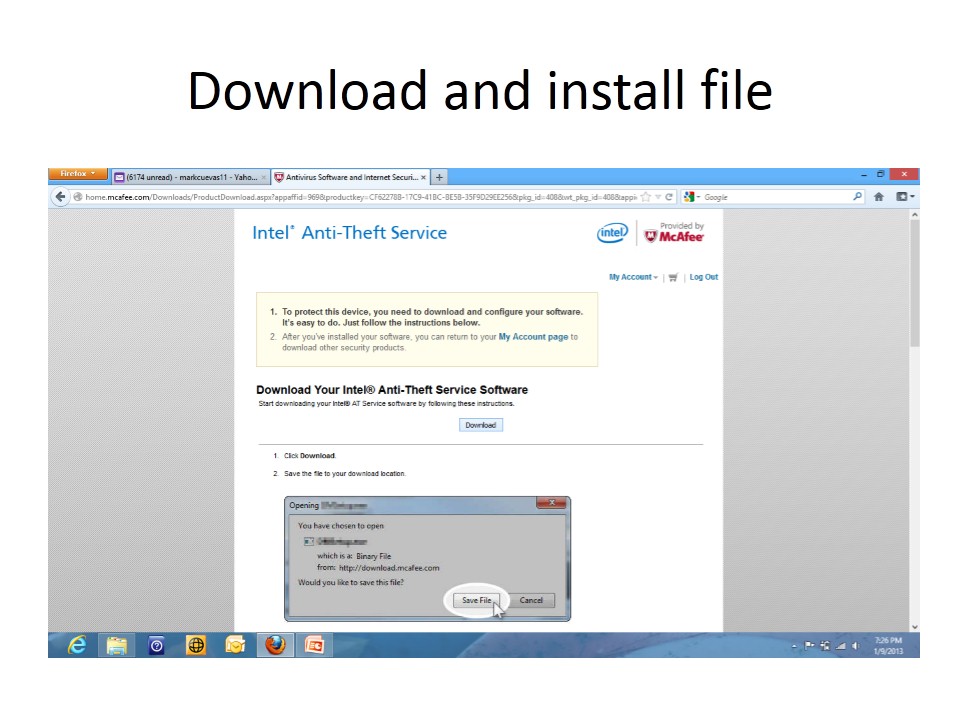
Intel Anti-Theft Technology Activation Tutorial

How to activate your Intel Anti-Theft Technology?


How to activate your 90-day FREE TRIAL of Intel Anti-Theft Technology?


 AT Service 90-day trial tutorial by Mark Cuevas, Retail Training Manager, Intel Philippines Support Team.
Activated using Samsung NP-530U4C-S06PH Series 5 14-inch Core i7 Win8 Ultrabook

What are notebooks equipped with Intel Anti-Theft Technology?

  • Ultrabooks


Buy Office 2010 and get Office 2013 Free

This offer is called Microsoft Office Tech Guarantee. This offer has been available in the versions of Office and Windows. This is a way to get to people buy the current version and will get the new software for free once available.

The Office Pre-Launch Offer has two distinct periods:
§  Eligibility Period – from October 19, 2012 to April 30, 2013: You must purchase, install, and activate your Office 2010 or Office for Mac 2011 product. You may sign up at Office.com/offer to be notified by email when the products are ready for download.
§  Redemption Period – from January 29, 2013 to May 31, 2013: If you signed up, you will receive an email from Microsoft when the new Office is ready for download. You must redeem the offer at Office.com/offer within the redemption period.

The following genuine Office products meet the purchase requirement of this Offer. Please note that not all products are available in all geographies.
§  Office Home and Student 2010
§  Office Home and Business 2010
§  Office Professional 2010
§  Office University 2010
§  Office for Mac Home & Student 2011
§  Office for Mac Home & Business 2011
§  Office for Mac University 2011
§  Individual Office 2010 applications


Qualifying products are only valid in the following formats:
§  Full-packaged product (FPP) - traditional disc version that includes a product key and media obtained from a retail or online store
§  Product key card (PKC), point of sale activation (POSA), electronic software download (ESD) - includes a product key but no media, obtained from a retail or online store as applicable
§  Direct original equipment manufacturer (DOEM) - pre-installed on a new PC

This offer is not valid for, but not limited to, the following:
§  Office 2010 and Office for Mac 2011 products obtained from anywhere other than a retail store, online retailer, reseller or direct original equipment manufacturer
§  Not-For-Resale or promotional Office 2010 product
§  Trial versions of Office 2010 product
§  Office Starter 2010
§  Office 2010 product purchased through the Volume Licensing Program
§  Office 2010 product purchased through the Home Use Program
§  Office 2010 product purchased through the Student Select Program
§  Office 2007 or earlier versions

For more details, please visit Microsoft Office Pre-Launch Offer Details and Terms website.